Split the difference with custom splits
Blog | Elements | EmbroideryStudio
April 5th, 2022
3 minute read
Custom Splits: Add Dimension and Detail to Your Embroidery
Custom Splits is a feature used by professional digitizers to create exciting designs with texture and detail while still optimizing designs for efficient machine run time. Wilcom’s EmbroideryStudio includes several features that help automate complex digitizing processes, and one of my favorites is the Custom Splits Element.
The Custom Splits Element offers several methods for adding definition and visual interest to your embroidery. You can use pre-set template designs or create your own effects with User Defined Split.
With Custom Splits, digitizers can control the precise needle penetrations required to form and complete an embroidered object. Add "splits' exactly where they are needed to create an impressive texture and visual effects.

TIP:
For the best satin stitch results with the User Defined Split feature, digitize split lines roughly perpendicular to the stitch angle.
Run Away Run Stitches
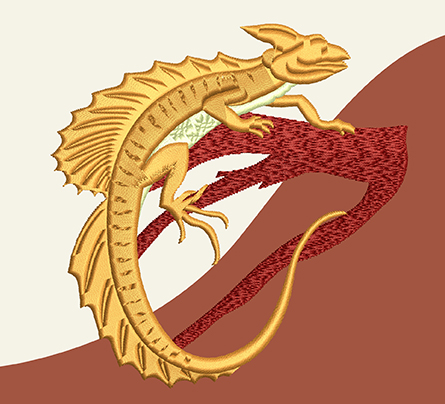
An outline run stitch is commonly used to define details in an embroidered shape. However, registration can become an issue during production. If the outline shifts slightly, the result can look misaligned.
An effective alternative is to use a Custom Split method, which builds the detail directly into the object itself and eliminates potential registration issues.
Custom Splits can be applied to satin stitch or tatami stitch types. Depending on the base stitch used, the resulting effect can vary in intensity, but it always adds visual interest and depth to the design.
Luxurious Satin Stitch
Satin stitch creates a richer, more luxurious appearance than flat tatami stitch. However, satin stitches have length limitations that can sometimes restrict how they are used.
Custom Splits allow you to take advantage of these limitations by intentionally splitting the satin stitches to help define shapes.
The upside is that you can digitize with satin stitch for that luxurious feel.

Fewer, Faster
Another advantage of Custom Splits is reducing the number of objects in your design.
Details that might normally require an additional object can instead be created as a split within a larger embroidery object. This removes the need for overlapping shapes and reduces the risk of objects pulling apart during stitching.
The result is faster digitizing, smoother production, and a cleaner design structure.
Flexible and Scalable Design
User Defined Splits is a powerful feature; instead of building the design object by object, digitizers can address the original design as a whole and create the one embroidery object that includes the split lines in a single step.
Most importantly, the splits remain fully scalable and editable, just like any other design object.
Dull to Exceptional
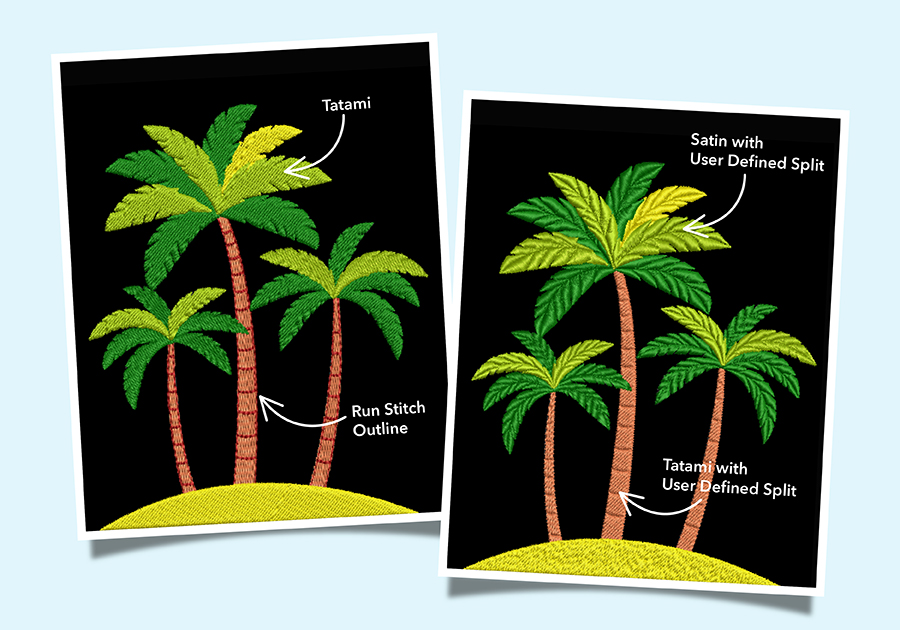
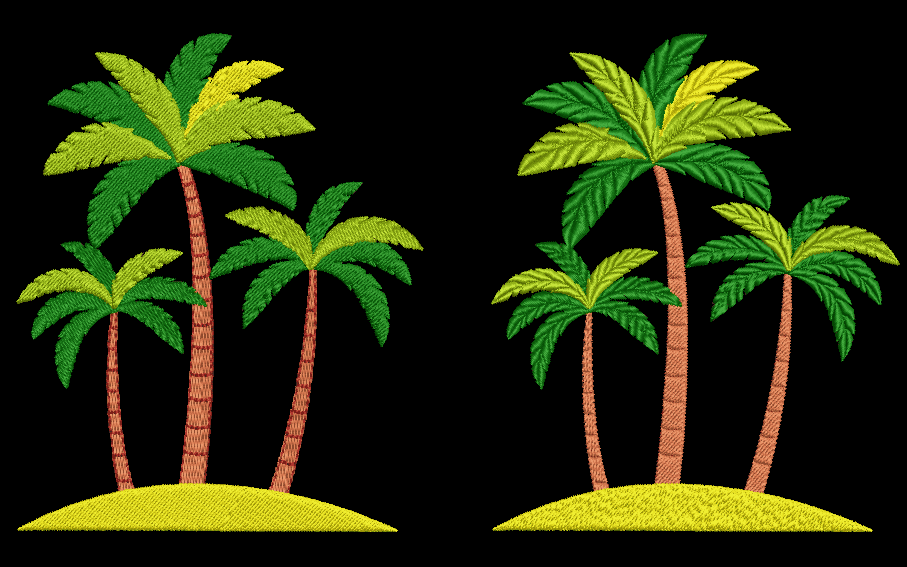
Compare the two palm tree designs.
One uses flat tatami stitching with a run stitch to define the trunk. The other uses split satin stitches for the palm leaves and split detail within the tatami trunk.
The split version creates a much richer effect. The palm leaves gain depth and dimension, and the trunk stitches cleanly without any registration concerns.

Expand Your Creative Toolkit
Custom Splits allow you to create detailed, textured embroidery designs that remain efficient in production.
Add User Defined Splits, carving, and other dimensional split effects to your embroidery repertoire and take your digitizing to the next level.
Custom Splits Add-on Element
Features include:
Flexi Split
Carving Stamp
Make Lines for Stitch Effects
User Defined Split
Explore everything StitchFEST has to offer, including inspiring blogs, live demonstrations,
educational content, free giveaways, and exclusive event-only discounts.
Don’t miss your chance to save 20% on EmbroideryStudio 2026 during the event.
Got questions? We’re here to help.
Contact us

Related Articles
Customizable Thread Collections in WilcomWorkspace
2 minute read
April 15th, 2022
Introducing Price Tables in Estimator
1 minute read
March 23rd, 2022
Cubbies automate its business process with Wilcom’s Embroidery Web API
4 minute read
April 19th, 2022