Design Explorer vs WilcomWorkspace Library Difference
When comparing Design Explorer vs WilcomWorkspace Library, it’s important to understand how these tools relate—and how they differ.
With the introduction of WilcomWorkspace Library, and the renaming of Design Library to Design Explorer in Wilcom’s embroidery software, many users are wondering what the difference is.
Both help you find and organize designs, but they do it in different ways.
Design Explorer vs WilcomWorkspace Library:
Key Differences
Design Explorer (formerly Design Library)
1. Local Design Management
Design Explorer is your local design management tool inside Wilcom's software, including EmbroideryStudio 2026.
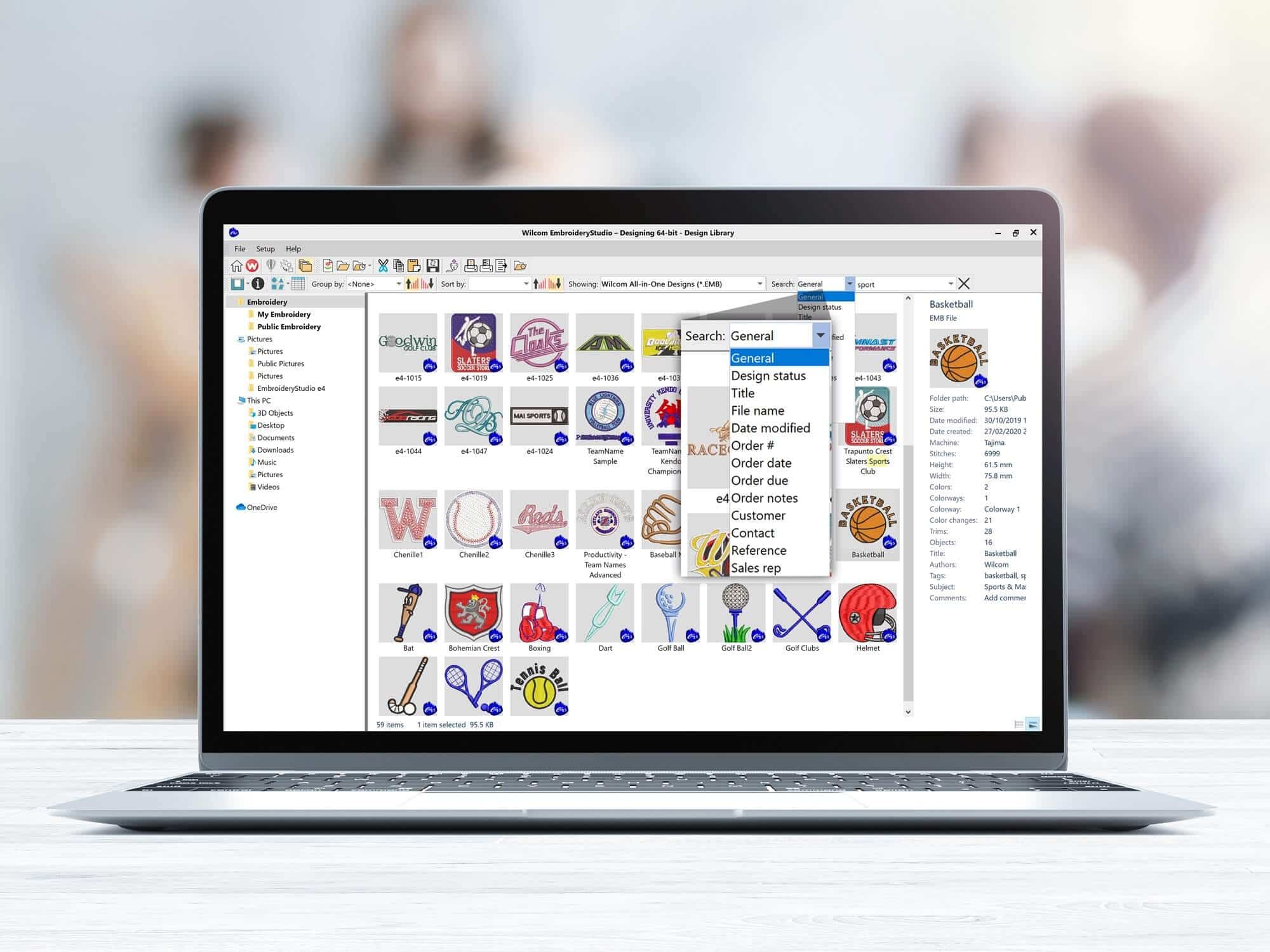
It works much like Windows File Explorer, allowing you to browse, access and view design folders on your computer or network. What you can see is based on your system access rights, just like any other folder.
Familiar, file-based browsing
- Navigate folders just like in File Explorer
- Access any supported embroidery or graphic file
- Add folders from your local drives or network locations
- Refresh your view instantly (just press F5)
Design Explorer acts as a “virtual library”—it doesn’t store designs itself, but instead brings together all your design locations into one convenient view.2. Search and display capability
Design Explorer allows you to:
- Search, sort, and grouping tools
- Browsing by customer, order, or file name
- Thumbnail previews for quick visual identification
Design iterations can be extremely valuable as a big cost-saving factor. During the development of a new embroidery design, many businesses may create multiple versions while exploring different ideas, effects, or layouts. Earlier iterations often contain elements that can be reused in future designs. These iterations can be saved for later search.
You can also customize how information is displayed:
- Columns can be rearranged and sorted
- Additional embroidery-specific details are available (e.g. design status, customer, order date)
- Layouts can be reset at any time
3. How it works
Because Design Explorer is locally based:
- Files remain on your computer or network
- You control how designs are organized
- Backups and file management are handled by you
It’s a simple, flexible solution for working with designs stored locally on your PC or your network folders, and is included as part of EmbroideryStudio 2026.
WilcomWorkspace Library
1. Secure Cloud-based Design Management
WilcomWorkspace Library builds on the same idea—organizing and finding designs—but delivers it through a cloud-based platform. Instead of working across multiple folders and locations, your designs are stored in a centralized, secure environment.
2. Smarter organization and control
WilcomWorkspace Library includes:
- Advanced indexing, tagging, and metadata
Design iterations can be valuable cost-saving assets. Earlier versions often contain ideas, effects, or elements that can be reused in future designs, especially when stored with searchable tags and metadata.
- A fully online solution
- A single, consistent version of each design
- File locking to prevent conflicts
- Support for organizing designs within a broader production workflow
3. Solving everyday challenges
Over time, even well-organized systems can run into issues. WilcomWorkspace Library is designed to address these:
- Duplicate files created through repeated backups
- Losing track of the latest approved version of a design
- Designs scattered across multiple folders, drives, computers, or locations
- Delays caused by searching for the right design or production file
- Limited visibility into where a design sits in the production process
With everything in one place, you always have a single source of truth—your designs are consistent, up-to-date, and easy to access.
4. Production workflow support
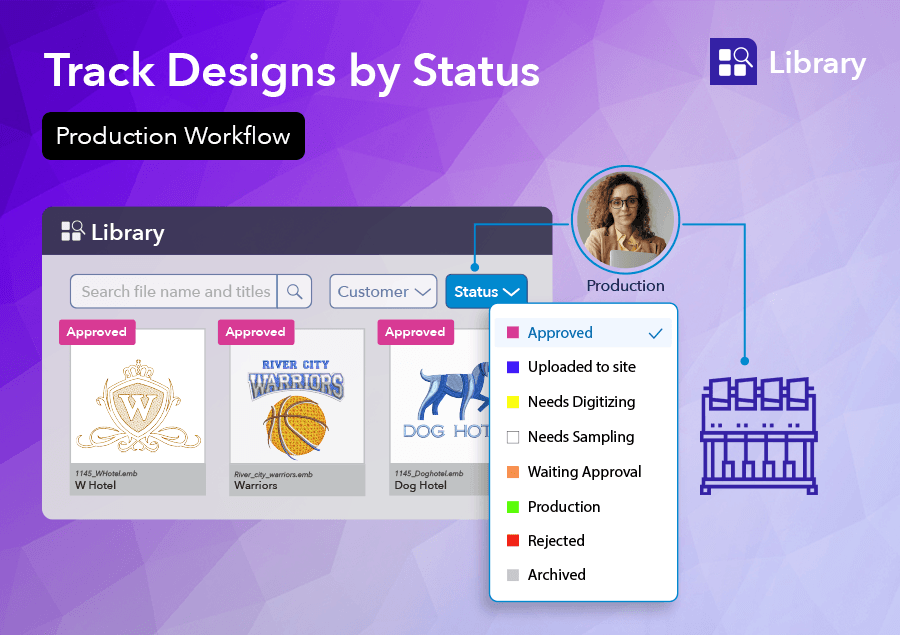
As an added benefit, Library supports the creation of a simple production workflow.
Status tags can be applied to designs, allowing teams to easily track progress, search by status, and manage designs as they move from digitizing and approval through to production.
5. Access anywhere
Because it’s cloud-based, your designs are:
- Accessible from any location
- Available on PC, Mac, and tablets
- Easy to access whenever you need them
This flexibility applies whether you’re working on your own or across multiple environments.
6. Designed to grow with you
WilcomWorkspace Library is part of a broader platform vision.
- It is available as a subscription-based service
- It focuses on design storage, and organization
Over time, deeper integration with EmbroideryStudio will further streamline how designs move between creation and management.
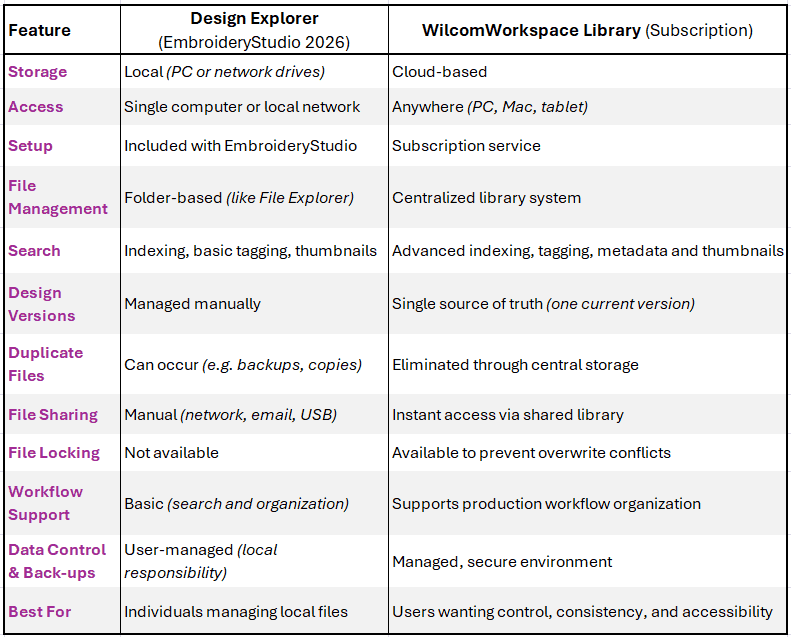
Design Explorer vs WilcomWorkspace Library
- Design Explorer (EmbroideryStudio 2026)
Browse and manage designs stored locally, using a familiar file-based approach - WilcomWorkspace Library (subscription)
Manage designs in a centralized, secure cloud-based system with better control, consistency, and accessibility.
Which one is right for you?
If you want:
- Better control over file versions
- Fewer duplicates and backup issues
- Secure, centralized access to your designs
- Easy sharing across teams, locations, and external partners
- Access across devices and locations
WilcomWorkspace Library offers clear advantages.

Design Explorer & WilcomWorkspace Library aren’t competing tools, they reflect different ways of working.
WilcomWorkspace Library is more than just storage. It provides a centralized way to organize, search, track, and manage embroidery designs, helping businesses improve visibility, collaboration, and efficiency.
For more information, please visit: https://wilcom.com/workspace/library
Ask about the world's
favorite embroidery software!

Got questions? We’re here to help.
Contact us