Wireless Design Transfer with Wilcom EmbroideryConnect will Revolutionize your Production
A new improvement we released in ES e4 with Update e4.1 is EmbroideryConnect.
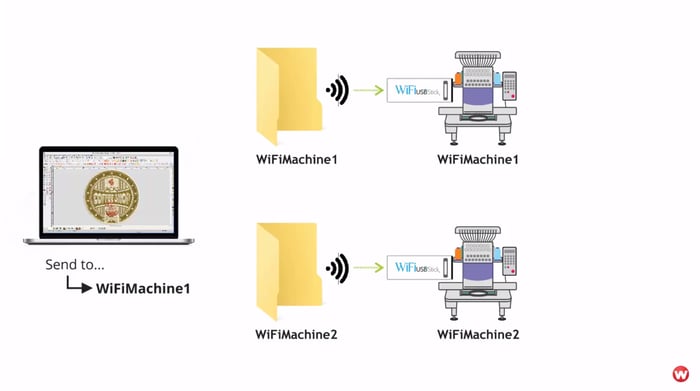
This new add-on Element allows your Wilcom EmbroideryStudio to send designs to your embroidery machine using your WiFi network, plus a new USB WiFi stick provided by Wilcom.
If only I had this in my days! Part of the pain of working an embroidery shop floor was running from machine to machine transfer designs. Back then we used floppy, but now USB gives the digitizers and machine operators the same workout.
The other drawback of classic USB sticks is wear and tear on the machine. Pulling a USB stick in and out of the machine controller will eventually wear out the USB port on the machine leaving you with a hefty replacement fee.
Checkout EmbroideryConnect in this video. You’ll love!
Ask about the world's
favorite embroidery software!

Got questions? We’re here to help.
Contact us